Small Text for Gaming: Unique Nicknames for Every Game (2026 Guide)
Complete guide to using small text in game nicknames. Compatibility tables for Steam, Valorant, Fortnite, LoL, Minecraft, Roblox and more. Style recommendations, game-specific workarounds, and Unicode name tips.
In gaming, your name is everything. It's what teammates call you in voice chat, what opponents see on the kill feed, and what shows up on leaderboards. A generic name blends into the background. A name with small text — superscript numbers, small caps clan tags, bold characters — gets noticed, remembered, and sometimes even feared.
But not every game handles Unicode the same way. Some accept almost anything (Minecraft Java Edition), others have strict character filters (Roblox), and a few (like League of Legends) fall somewhere in between. This guide covers the compatibility of every major game with all 9 small text styles, plus nickname ideas that won't get you reported.
Game-by-Game Compatibility
Valorant
Compatibility: Excellent. Riot's tactical shooter has the best Unicode support of any competitive game. Superscript letters, superscript numbers, and small caps all render cleanly in your name and in-game chat.
- Name examples: "Phantom⁰⁷", "ᴀᴄᴇᴜ" (ACEU in small caps)
- Agent select screen: Names display in full — your styled name shows up exactly as entered
- Kill feed: Unicode characters appear correctly in the kill feed, making your name stand out even there
- Best styles: Superscript letters + superscript numbers, Small Caps, Bold
Fortnite
Compatibility: Good, but with caveats. Epic Games supports Unicode in display names, but periodically updates its name filtering policy. Superscript and Small Caps have historically worked well.
- Name examples: "Tilted²⁰²⁶", "ɢʜᴏsᴛ" (GHOST in small caps)
- Warning: If your name stops displaying after an update, Epic may have tightened character restrictions. Superscript numbers are the most future-proof choice
- Best styles: Superscript numbers, Small Caps
Steam
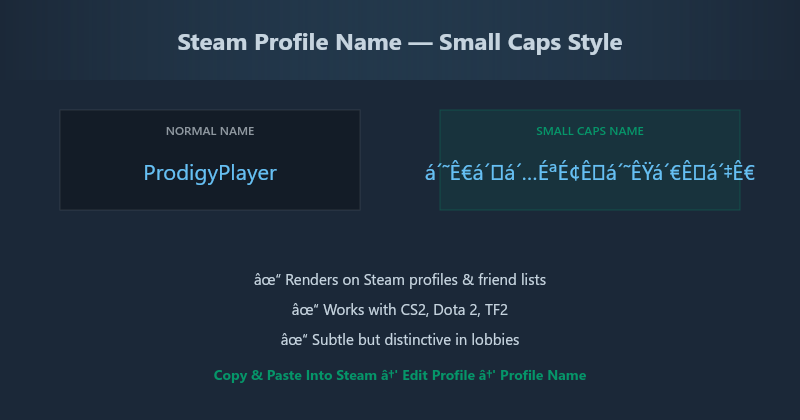
Compatibility: Partial. Steam profile names support most Unicode, but the in-game overlay strips certain characters depending on the game. What works on your profile may not work in CS2 or Dota 2.
- Name examples: "ᴘʀᴏᴅɪɢʏ", "Carry¹"
- Profile vs In-game: Small Caps and Bold render beautifully on Steam profiles; in-game behavior depends entirely on the game's character filter, not Steam's
- Best styles: Small Caps, Bold, Superscript numbers
League of Legends
Compatibility: Limited. Riot's name filter is stricter than Valorant's. Superscript numbers usually pass, but superscript letters are frequently blocked. Small Caps is hit-or-miss depending on the patch.
- Name examples: "Mid²⁰²⁶", "Jungle⁰⁷"
- Safe approach: Regular letters + superscript numbers at the end. Don't try full superscript names — Riot's filter will reject them
- Best styles: Superscript numbers only
Minecraft (Java Edition)
Compatibility: Excellent. Java Edition has near-complete Unicode support. Every style in our generator works, including Bubble Text, Bold, Italic, and Bold Italic. This is the most small-text-friendly game on the list.
- Name examples: "ⓈⓉⒺⓋⒺ", "𝐇𝐞𝐫𝐨𝐛𝐫𝐢𝐧𝐞"
- Server compatibility: Some servers restrict Unicode characters in chat, even if they appear in your name. Check server rules
- Bedrock Edition: More restrictive than Java. Stick to superscript and numbers on Bedrock
Roblox
Compatibility: Limited. Roblox has aggressive character filtering. Most styled Unicode characters are rejected in usernames and display names.
- What works: Basic superscript numbers (¹²³) sometimes pass. Anything else is likely blocked
- Best styles: Superscript numbers ¹²³ only, and even those aren't guaranteed
Full Compatibility Table
| Game | Superscript | Small Caps | Bubble | Bold | Numbers |
|---|---|---|---|---|---|
| Valorant | ✅ Full | ✅ Full | ✅ Full | ✅ Full | ✅ Full |
| Fortnite | ⚠️ Partial | ⚠️ Partial | ❌ No | ⚠️ Partial | ✅ Full |
| Steam (Profile) | ✅ Full | ✅ Full | ✅ Full | ✅ Full | ✅ Full |
| Steam (In-Game) | ⚠️ Varies | ⚠️ Varies | ⚠️ Varies | ⚠️ Varies | ✅ Full |
| LoL | ❌ No | ❌ No | ❌ No | ❌ No | ✅ Full |
| Minecraft Java | ✅ Full | ✅ Full | ✅ Full | ✅ Full | ✅ Full |
| Minecraft Bedrock | ⚠️ Partial | ❌ No | ❌ No | ❌ No | ✅ Full |
| Roblox | ❌ No | ❌ No | ❌ No | ❌ No | ⚠️ Partial |
| CS2 | ⚠️ Partial | ⚠️ Partial | ❌ No | ❌ No | ✅ Full |
| Apex Legends | ✅ Full | ✅ Full | ⚠️ Partial | ✅ Full | ✅ Full |
Gaming Nickname Ideas by Role
Competitive / Ranked Players
- Rank display: "Jett²⁰²⁶" — show your peak rank year without looking boastful
- Role tags: "ᵐᵃⁿⁿᵈᴳᵃᵐᵉʳ" for support mains in MOBA games
- Clan tags: "[ᴀᴄᴇ]PlayerName" — small caps clan tag looks like an official badge
Casual / Social Players
- Fun names: "ⓉⓇⓎⒽⒶⓇⒹ" (TRYHARD in bubble text) — self-aware humor
- Status names: "ᵃᶠᵏ_Farmer" for Minecraft or open-world games
- Theme names: "ᴛʜᴇᴅʀᴀɢᴏɴ" in small caps has fantasy RPG vibes
Streamers & Content Creators
- Brand names: "𝐒𝐭𝐫𝐞𝐚𝐦𝐞𝐫𝐍𝐚𝐦𝐞" in bold stands out in Twitch chat and on overlays
- Alt accounts: "MainAlt⁰²" — superscript numbers distinguish alts without cluttering the name
Important Warnings for Competitive Play
- Tournament rules vary: Many esports tournaments require standard ASCII names for broadcast readability. A name that's fine in ranked play may be rejected in a tournament. Always check the rulebook
- Reporting risk: Names that are hard to read, memorize, or type can lead to false reports. Keep your name identifiable — don't make the entire thing Wingdings-style gibberish
- Patch changes: Game developers update character filters without warning. A name that works today may break after the next patch. Superscript numbers (⁰¹²³⁴⁵⁶⁷⁸⁹) are the most stable — they've been in Unicode since version 1.0
- Console limitations: PlayStation, Xbox, and Nintendo Switch have stricter character filters than PC. If you play cross-platform, test your name on console before committing to a paid name change
Overwatch 2
Compatibility: Good. Blizzard's hero shooter accepts superscript and Small Caps in BattleTag names. The 12-character BattleTag limit makes Small Caps particularly useful — a name like "ᴘʀá´á´…ɪɢÊ" (PRODIGY in small caps) uses the same character count as "PRODIGY" but looks more distinctive. Superscript numbers are also reliable for adding a year tag ("ᴘⱼᵃʳ⿠xâ·€"). Bubble Text is blocked by Blizzard's filter.
Call of Duty (Warzone, Modern Warfare)
Compatibility: Limited. Activision's name filter is among the most restrictive in gaming. Username changes require a rename token, and the filter blocks most Unicode characters beyond basic Latin. Superscript numbers (¹²³) work on Xbox and PlayStation COD profiles but are rejected on PC. Small Caps, Bold, and Bubble Text are universally blocked.
- What works: On console COD profiles only — superscript numbers appended to a standard name
- What doesn't: PC Battle.net profiles, full small text names, any styled letters
- Workaround: Use clan tags for Unicode flair instead. Clan tags have fewer restrictions
Crossplay & Console Considerations
If you play cross-platform (PC + console), your small text name must render on both. This is the most common failure point for gaming nicknames. PlayStation and Xbox use system-level character filters that are often stricter than individual game filters. A name that works on Valorant PC may show as blank boxes on Valorant console.
- PlayStation Network: Restrictive. Only superscript numbers reliably pass. Small Caps and Bold are blocked
- Xbox Live: Similar restrictions to PSN. Use superscript numbers only for cross-platform play
- Nintendo Switch: Most restrictive. Virtually no Unicode styling survives Nintendo's name filter
- Steam Deck: Same as Steam PC — full Unicode support
Golden rule for crossplay: If your friend group spans platforms, use superscript numbers only. They're the lowest common denominator across all platform filters.
How to Set Up Your Gaming Nickname
- Open the Small Text Generator
- Type your desired name or tag
- Check the compatibility table above for your game
- Copy the style that works: Superscript for Valorant, Numbers only for League, Small Caps for Steam profiles
- Paste into the game's name change field and save
- Test in a private or practice lobby before going public
Start Customizing Your Name
A unique gaming name is one of the few things every player can control — and it costs nothing. Open the Small Text Generator, type your idea, and see all 9 styles instantly. Copy the one that fits your game, paste it into the name field, and start getting noticed. No ads, no sign-up, no downloads.